
Getting started
Build a small console app that renders a service table and asks what to do next. You only need the core Consoul package.
1. Create an app
Use a supported .NET SDK; these commands create a .NET 8 console application:
dotnet new console --name HelloConsoul --framework net8.0
cd HelloConsoul
This site documents 3.0.0. Once that version is available on your package source, install it explicitly:
dotnet add package Consoul --version 3.0.0
For local testing before publication, build the packages from this repository and use a local feed as described in Installation. An unversioned install may select a 2.x release with different APIs.
2. Replace Program.cs
This is a complete program. The ConsoulLibrary namespace contains the APIs used below.
using System;
using ConsoulLibrary;

Consoul.MarkupLine("[cyan]Service dashboard[/]");

var table = new Table()
    .RoundedBorder()
    .Width(48)
    .HideFooter()
    .AddColumn("Service")
    .AddColumn("State")
    .AddRow("API", "[green]Healthy[/]")
    .AddRow("Worker", "[yellow]Starting[/]");
AnsiConsole.Write(table);

var prompt = new SelectionPrompt("What next?", clear: false);
prompt.Add("View status", ConsoleColor.Cyan, isDefault: true);
prompt.Add("Exit", ConsoleColor.DarkGray);

PromptResult result = prompt.Render();
if (result.IsCanceled || !result.HasSelection || result.Index == 1)
{
    return;
}

Consoul.MarkupLine("[green]All systems ready.[/]");
3. Run it
dotnet run
Enter 1 to view status, 2 to exit, or back to cancel. Pressing Enter accepts the default option. The returned Index is zero-based. clear: false keeps the table visible above the prompt.
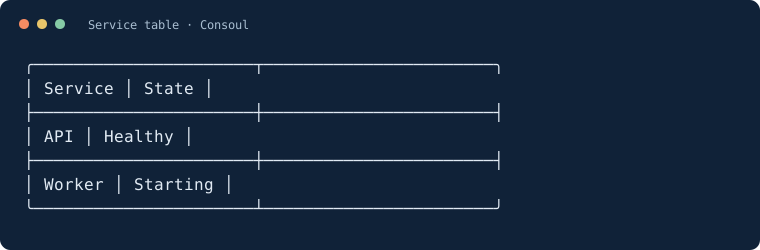
The table output looks like this (plain-text capture, without terminal colors):
Handle input explicitly
Prompt results distinguish a selected value from cancellation. Check HasValue or HasSelection before using input:
using ConsoulLibrary;

TextPromptResult<int> retries = Consoul.Text<int>("Retry count")
    .Range(0, 5)
    .Render();

if (retries.HasValue)
{
    Consoul.Write($"Using {retries.Value} retries.");
}
Where to go next
| Build | Read |
|---|---|
| A reusable menu with actions | Views |
| Validated input or a selection list | Prompts |
| A table from model objects | Tables |
| A busy indicator or task tracker | Progress |
| A command-line tool with arguments | Optional packages |
See Examples & screenshots for more small programs. Upgrading an existing app? Follow the 2.x migration guide.